WordPressWebsitesCMS - Content Management SystemUX/UI design21 min czas czytania22 705 znaków4074 słowa
WordPress themes — how to choose one you will not be replacing in a year
WordPress themes are not chosen on looks: the directory shows three fields that tell you what a theme will cost you in a year. And what disappears when you switch.

Redakcja Digital VantageYour Partner in Business, Digital Vantage Team · Digital Vantage team is a group of experienced professionals combining expertise in web development, software engineering, DevOps, UX/UI design and digital marketing. Together we carry out projects from concept to implementation - websites, e-commerce stores, dedicated applications and digital strategies.
Our team combines years of experience from technology corporations with the flexibility and immediacy of working in a smaller, close-knit structure. We work in agile methodologies, focus on transparent communication and treat each project as if it were our own business.
The strength of the team is the diversity of perspectives - from systems architecture and infrastructure, frontend and design, to SEO and content marketing strategy. As a result, the client receives a cohesive solution where technology, aesthetics and business goals go hand in hand.
Publikacja
Aktualizacja
The WordPress theme directory holds 8 694 themes today — that is what its own API returns, queried on the day this article was written. Several thousand more sit in commercial marketplaces. A choice made from a list that long is almost always made the same way: scrolling through previews until one of them looks right.
The problem is that the look in the preview is the least durable part of that decision. Colours and fonts you can change in half an hour. Whether the theme will still be maintained a year from now, whether it can be swapped out safely, and how much it adds to your loading time — none of that shows up in a screenshot, and all of it is what the theme actually costs you.
This article is about three things you can see in the directory before you install anything, and one thing you only see when you change theme — which usually means a year or two later.
What you will find in this article. How a theme differs from a template and from a page builder. The three directory fields that tell you more than the preview does. When a free theme is enough, and what you are actually paying for in a commercial one. Block themes against classic ones — and what that difference changes in day-to-day work. Child themes. The demo content trap. What a theme does to page speed. And what stays, and what goes, when you swap a theme out.
Theme, template, page builder — three words for three different things
Start with the naming, because it is the part that gets muddled most often and causes the most expensive misunderstandings in a conversation with a developer.
A theme is the package of files that decides how the site looks and which parts of it you are allowed to edit at all. In the admin it lives under Appearance → Themes, with the active one at the top of the list and every other installed theme below it.
A template is something narrower. Inside WordPress the word has a specific job: a template is one layout inside a theme — the one used for a single post, for an archive listing, for a standalone page. A theme ships a set of them. So when a marketplace advertises WordPress templates, it is almost always selling themes, while the WordPress admin means something considerably smaller by the same word. It is worth establishing which of the two the person on the other side of the conversation means before you agree to anything, because "we will build you a template" and "we will build you a theme" are quotes for different amounts of work.
A page builder is a different thing again. It is a plugin for assembling layouts by dragging elements around, it works independently of the theme, and it takes over the appearance of every page you build with it. That is why "which theme should we use" and "should we use a page builder" are two separate decisions, and the answer to the second one changes how much the first one matters — we take that apart in the article on page builders and editors. If you are only just setting a site up, the order is not the one most people assume: installation and first settings come first, then the theme, and the content after both of them.
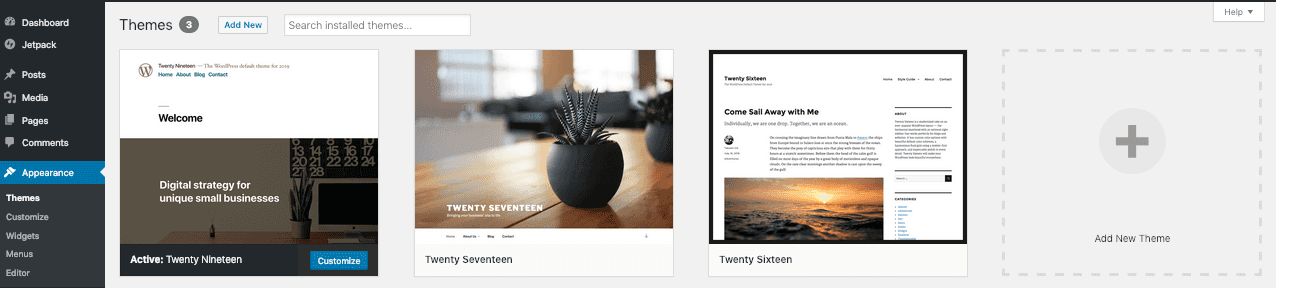
The theme list screen in the WordPress admin, in a screenshot from its official documentation (CC0 licence). The active theme comes first, and every other one below it carries a preview button and an activate button.
Three things the directory tells you outright
Next to every theme, the WordPress directory publishes three pieces of information that say nothing whatsoever about how good it looks, and almost everything about what it will cost you.
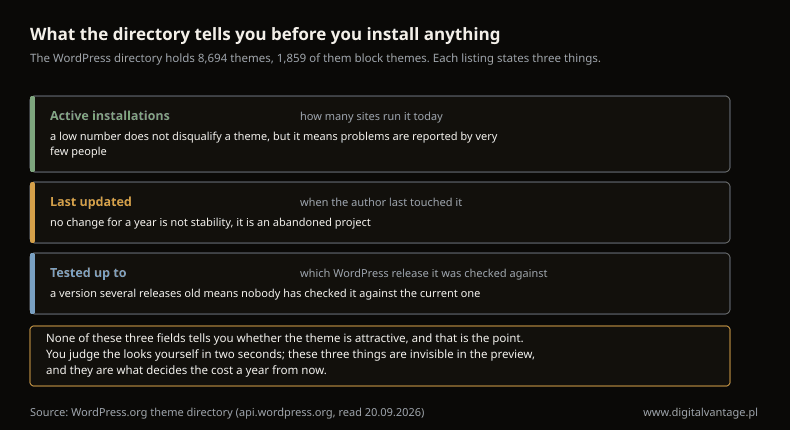
What the directory tells you before you install anything
WordPress.org theme directory (api.wordpress.org, read 20.09.2026)
Active installations. The number of sites running the theme today. This is not a popularity contest: a low number does not mean a bad theme, it means a smaller pool of people who will hit a bug and report it to the author before it reaches your site. On a theme with a few thousand installations, you are one of the first testers of every new release — which is fine if you know it, and unpleasant if you do not.
Last updated. This is the most important of the three. A theme with no changes for a year is not "stable" — it is abandoned, and an abandoned theme does not break on the day its author loses interest. It breaks when WordPress changes, or when your host moves the server to a newer version of PHP. At that point you are left with a design nobody will fix and a decision about replacing it taken at the worst possible moment: under pressure, on somebody else's schedule.
Tested up to. The directory shows which WordPress release the author last checked the theme against. If that release is several versions behind, nobody has confirmed the theme works with what you are actually running. The current core release is 7.1.1.
The same three fields appear on every plugin in the directory, and the risk arithmetic works there in exactly the same way — we go through it in the article on updates.
Free WordPress themes against paid ones
The WordPress.org directory is free from end to end, and for most company websites it is entirely enough. It is still worth knowing what you are paying for in a commercial theme, because the honest answer is not "better looks".
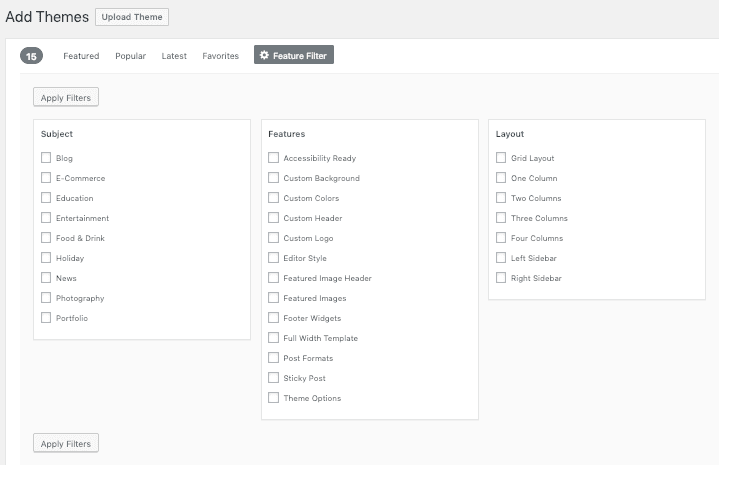
The directory filters in the admin (screenshot from the WordPress documentation, CC0) let you narrow the list by layout and by feature — a faster route from 8 694 themes down to a dozen than scrolling through previews.
A paid theme usually buys three things. Support, meaning somebody who answers when something stops working. Ready-made layouts for specific industries, which can take days off the build. And update cadence — a commercial author has a reason to keep up with changes in WordPress, because that is the business they are in.
What a paid theme does not buy. It does not buy speed: heavyweight multipurpose themes are often slower than simple free ones, because they load everything on the off-chance that you might need it. It does not buy independence either — with a paid theme, exactly as with a free one, you check the last-updated date, because both kinds get abandoned and the invoice does not prevent it.
A practical rule: start with the free directory and reach for a paid theme only once you know what specifically the free one is missing. It is worth remembering that every theme in the WordPress.org directory goes through a review before it is published, while a commercial one goes through nothing but the vendor's own check. If the answer to "what is missing" is "I am not sure, but the paid one looks better", that is not yet a reason to spend money. Where a theme sits in the overall bill for a website, we break down in the costs article.
Themes from outside the directory
Outside WordPress.org there are marketplaces selling commercial themes, and the authors' own shops. Buying there is perfectly normal, but it runs on different rules from a directory where everything is free and everything is visible.
Three things worth reading in the terms before you pay:
- How long updates are included. In the directory, updates keep arriving for as long as the author keeps developing the theme. In marketplaces it is frequently different: a one-off payment often means one year of updates, after which you renew the licence to carry on receiving them.
- How many sites you may use it on. Licences are often tied to a single domain, and a second site means buying it a second time.
- What happens when the licence lapses. The theme normally keeps working — but without updates, which is to say exactly like an abandoned one. The same problem, only with an invoice attached to it.
The test is the same one the directory invites: the question is not "is it good-looking", it is "will it still be maintained in a year, and on what terms". With a paid theme it is also worth checking whether the author publishes anything else at all — one theme and two years of silence is a sign that the project has finished, whatever the sales page says.
Block themes against classic themes
This is the most important technical distinction in today's directory, and the only one that changes how you work with the site day to day.
Since version 5.9, WordPress has had block themes. The documentation defines one as a theme that "uses blocks for all parts of a site, including navigation menus, header, content, and site footer" — the whole site, header, footer and menus included, is assembled from the same blocks as the body of a post, and all of it is edited in one place. In a classic theme the header and the footer live in code; changing anything in them requires either an option the author thought to provide, or a developer.
The proportions in the directory: 1 859 of the 8 694 themes are block themes, roughly one in five. The rest are classic themes — still working, and many of them still actively developed.
What follows from that when you are choosing:
- If you want to change the site yourself, a block theme gives you access to the parts that previously needed a developer. On a site that actually changes, that is real money rather than a feature list.
- If the site is going to stand untouched for three years, the difference is secondary, and what matters is whether the theme is maintained at all.
- If you use a page builder, a block theme changes very little, because the plugin lays the pages out anyway — and in that case it is worth picking the plainest theme you can find, so that the two tools are not doing the same job twice.
Child themes, or how not to lose your own changes
This is the one thing worth knowing before anybody starts "just tweaking the theme", because it applies to every classic theme and it costs exactly as much as the work you put into it.
If a developer changes something directly in the theme files — adds a function, adjusts the header, reworks the layout of the post list — those changes vanish with the first theme update. The WordPress documentation puts it in a single sentence: "the next time your theme is updated, your function will disappear!".
The answer is a child theme. The documentation describes it like this: "A child theme includes everything from its parent theme by default" — it inherits the look and the functions of the parent theme, but lets you make changes without touching the parent's files. That way, in the documentation's own words, "you can still receive updates to the parent theme without losing those modifications".
The practical consequence for a site owner comes down to one question worth putting to whoever does the work: will the changes go into a child theme, or straight into the theme? The second answer means either that you lose those changes at the next update, or that nobody will ever update the theme — and then we are back at the last-updated date from the section above, except this time the abandonment is on your side of the fence rather than the author's.
With block themes the problem looks different: changes made in the editor are saved to the database rather than to files, so a theme update does not wipe them. That is one of the reasons it is worth knowing which of the two kinds you are running before you commission any work on it.
A multipurpose theme or a simple one
The directory contains two schools of thought. Multipurpose themes promise dozens of ready-made layouts for every conceivable industry, and usually bring a builder of their own. Simple themes do one job: decent typography, a grid, and a handful of page layouts.
The difference shows up in three places:
- At the start the multipurpose theme wins outright: you click the layout for your industry and the site looks finished the same day.
- On speed it usually loses, because it loads machinery you never use — and that shows up in the measurements Google takes.
- On replacement it loses most visibly of all: the more of the site was built with its own tools, the more of the site disappears when the theme is swapped out.
There is no single right answer here. There is a question that settles it: is this site going to stand for three years unchanged, or is it going to live? In the first case a multipurpose theme is a convenient shortcut and the lock-in never costs you anything. In the second, a simple theme plus plugins chosen for specific jobs works out cheaper, because each of those pieces can be replaced on its own.
Demo content — the most expensive trap
Almost every large theme offers to import "the site as shown in the preview": one click, and you get a complete set of example pages, images, menus and settings. It looks like a shortcut, and sometimes it genuinely is one, but it has two consequences worth knowing about beforehand rather than afterwards.
First, this is data, not appearance. Those example pages land in the database like any other content. You then have to tell them apart from your own and delete the ones you are not using — otherwise they stay on the site, remain reachable at their own addresses, and can find their way into search results under your domain. What to do with addresses that have disappeared, or that should never have existed in the first place, we cover in the article on the 404 error.
Second, the photographs from the preview are almost never part of the package. In the demo they are doing half the work of the impression; after the import you are left with empty frames or watermarks, because the author has no right to license those images onward. This is by some distance the most common source of the "it looks different on my site than it did in the preview" disappointment, and it has nothing to do with anybody doing the import badly.
The sensible approach: import the demo content on a copy of the site, not on the live one — and if you are doing it straight on the real site anyway, take a backup first, because undoing an import by hand can take longer than building the site from scratch would have done.
Themes and page speed
Appearance is not neutral with respect to loading time. The theme decides how many files the browser has to fetch before anything at all appears on screen, and whether the layout jumps around while the rest of it arrives.
Two symptoms are easy to check before you install. The number of variants and features you are never going to use: a "universal" theme with fifty layouts normally loads a great deal more than any one of those layouts needs. And bundled animation libraries and fonts, piled on top of whatever the site is already loading for its own reasons.
None of this means you have to pick the plainest and ugliest thing in the directory. It means that after installing you should measure — and measure what Google measures, rather than the single composite score a tool prints at you. The three thresholds, and the difference between a lab test and data from real visitors, we take apart in the article on Core Web Vitals. Separately, it is worth checking whether the theme breaks accessibility — contrast and text size in themes are often set for an attractive screenshot rather than for reading.
Changing the theme on a live site
The most important thing you cannot see at all while choosing: what happens when, a year or two from now, you want a different theme.
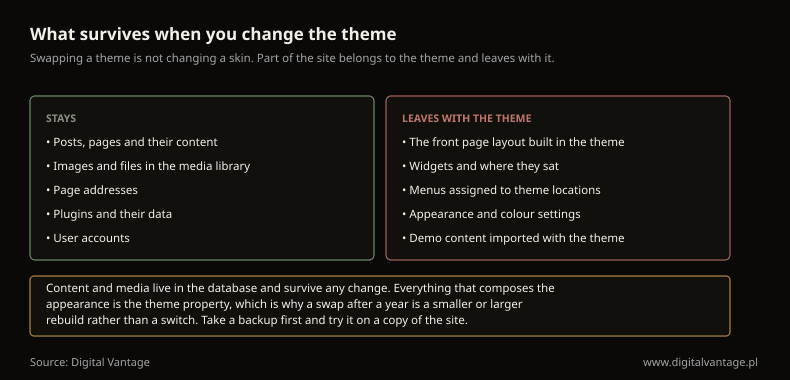
What survives when you change the theme
Own analysis
The split is simple, and it follows from where each thing is stored. Content, images, page addresses, plugins and user accounts sit in the database — they survive any theme change. The front page layout, the widgets and where they stood, the assignment of menus to positions in the theme, and every appearance and colour setting belong to the theme — they leave together with it.
In practice this means that the more of the site you built with the theme's own tools, the more expensive changing it will be. That is not an argument against such themes; it is an argument for knowing what you are choosing. A simple theme plus plugins for the functionality makes the swap easier. A large theme with everything inside gives you a faster start and a harder exit. Both are legitimate choices, and only one of them is usually made deliberately.
Three things to do at every theme change: a backup, a test on a copy of the site rather than on the live one, and a walk through the sub-pages afterwards, because sub-pages are where missing pieces show up first and home pages are where they hide. If addresses change along the way, you need redirects — we cover those in the article on migrating a site.
Five checks before you install
The quarter of an hour that saves you a rebuild:
- The three directory fields — last updated, number of installations, tested-up-to version. If any one of them looks wrong, there is no point reading any further down the page.
- The live preview, not the picture — in the admin, every theme previews against your own content. The screenshot in the directory shows somebody else's site; the preview shows yours, with your text lengths and your images.
- A page with a long article and a page with a form — those are the two layouts themes most often get wrong, and neither of them is visible in a preview of the home page.
- A phone — check the preview on a phone before you check it on a desktop. The narrow layout is the harder of the two to get right, and it is the one theme authors most often leave until last.
- Contrast and text size — themes are frequently designed for an attractive screenshot rather than for reading; what follows from that, legally and practically, we cover in the article on accessibility.
If a theme passes all five, the remaining risk comes down to taste — and taste is cheaper to change than anything else on this list.
What this article deliberately leaves out
- Page builders — a separate article, because that decision is independent of the theme.
- Website builders sold as a subscription — a website builder bought as a service is a different category altogether.
- Installation and the first settings — installing WordPress.
- Building your own theme — that is development work, not a choice from a directory.
The shortest possible summary: WordPress themes are chosen on three directory fields, not on the preview. The last-updated date, the number of installations and the version the theme was tested against tell you whether it will still be working in a year. And before you build an entire site on top of one, it is worth knowing that when you change it, the content and the media stay, and everything that made up the appearance disappears with it.
Not sure whether your theme is still being maintained?
We can check the last-updated date on your theme and plugins, whether they still match the current WordPress release, and how much of your loading time the design is responsible for.
Related Posts
- Website tools — five situations and the one text that fits yours
Five situations: choosing a system, building it yourself, WordPress editors, checking a finished site, and measuring it. Start with the one that is yours.
- 1.Website builder — what it costs after year one and what you can take with you
Four pricing mechanisms hidden in builder plans, what the second year actually costs, and what you can export when you outgrow the tool.
- 2.WordPress page builder — what a visual editor costs and when it stops paying
Gutenberg, Elementor or Divi: renewal prices, the plugin bill nobody quotes, and three thresholds where a visual editor costs more than it saves.
- 3.Website testing — how to check a site so the result means something
Why a single measurement proves nothing, how a lab score differs from field data, and what to check before a site goes live and before you sign it off.
- 4.Content management system — who in the company gets to change what
What a CMS actually solves, the three families worth knowing, and how to choose before anyone says a product name. With a change-frequency matrix.
- 5.Website analytics — what your numbers do when people refuse cookies
What happens to the data when someone clicks reject, why a small site never gets GA4 modelling, and why one consent instead of three costs you data.
- 6.Complete WordPress Setup Guide - how to create a professional company website step-by-step
Learn more about Wordpress Setup. A practical guide with concrete tips and examples. Learn best practices and avoid common mistakes.
- 1.
About the Team
Digital Vantage Team
Your Partner in Business, Digital Vantage Team
Digital Vantage team is a group of experienced professionals combining expertise in web development, software engineering, DevOps, UX/UI design and digital marketing. Together we carry out projects from concept to implementation - websites, e-commerce stores, dedicated applications and digital strategies. Our team combines years of experience from technology corporations with the flexibility and immediacy of working in a smaller, close-knit structure. We work in agile methodologies, focus on transparent communication and treat each project as if it were our own business. The strength of the team is the diversity of perspectives - from systems architecture and infrastructure, frontend and design, to SEO and content marketing strategy. As a result, the client receives a cohesive solution where technology, aesthetics and business goals go hand in hand.