Advertising and campaignsAnalytics and measurementCybersecurity18 min reading time20,129 characters3,580 words
Link shortening — how to shorten a link, track clicks and choose a shortener
How a short link works, where it pays off (SMS, email, bio, print), how to tag it with UTM so it does not vanish in GA4, and how to choose a shortener.

Konrad BarejkoYour Business Partner, CEO · Experienced technology leader and entrepreneur with over 20 years of experience in the IT industry. Specializes in digital transformation, software product development and building engineering teams.
For nearly 15 years, he led B2B teams at a global technology corporation, managing a 40-person team of developers and engineers, multi-million dollar budgets and products deployed at the scale of tens of millions of licenses in EMEA and global markets.
Today, as the founder of his own consulting firm, he helps small and medium-sized businesses make smart technology decisions - from website and online store development, to process automation, to comprehensive IT consulting.
He combines strategic thinking with a hands-on technical background in web development, DevOps and software architecture. He focuses on a collaborative culture, agile methodologies and solutions that realistically support business growth.
Published
Updated
A short link is not a cosmetic version of an address. It is a redirect: the service stores where to send people and does so on every click. That is why a short link can be counted, changed after publication and tagged so that your analytics knows where a visitor came from. The same mechanism makes it easy to lose in reports — without UTM parameters, a visit from a short link looks in Google Analytics like someone who typed the address from memory. Below: what happens between the click and the page, how to shorten a link, where it makes sense, how to tag links and how to choose a shortener.
We use DVN Links — our own link shortener, run by Digital Vantage — for the examples (the operator is named in the service's terms). We write about it the way we would about someone else's tool: with a date next to every feature and the limitations next to the strengths. The first limitation for an English-speaking reader: the service and its help pages are currently in Polish. The product is growing, so everything we say about it reflects its state on 6 October 2026. For the wider picture — where to start with online marketing and where campaign measurement fits in — see our guide to online marketing.
Link shortening — what happens between the click and the page
A shortener does not shorten the page address. It creates a new, short address that points to the old one. The service stores an "alias → destination" pair. When someone clicks dvn.dev/abc, the browser asks the shortener's server, the server answers with a redirect status and a Location header, and the browser goes straight to that address. The person does not see it, but in that one moment the shortener can record the click: the date, country, device and the page it came from.
Redirects are either permanent or temporary. According to Google Search Central documentation (updated 14 April 2026), Google treats 301 and 308 redirects as a signal that the destination is canonical, and 302, 303 and 307 as no such signal. We checked our own shortener: dvn.dev answers with a 302 (measured on 6 October 2026). For the destination page this makes no difference — a short address is not a page anyone wants in search results, and a link to the page in Google leads straight to its real address anyway. A 301 matters in a different situation: when you move a site to a new address and want to keep its rankings. That is a separate topic, covered in our article on website migration and 301 redirects.
The most important property of a short link follows from this mechanism: you can change the destination without changing the link. The DVN Links FAQ states that you can change the destination URL at any time without changing the short link (dvnlinks.pl/faq, Polish, read on 6 October 2026). A printed leaflet, a sent SMS or a recorded podcast will not go out of date when you move an offer to a different page — provided the short link still works. We come back to that condition when choosing a shortener.
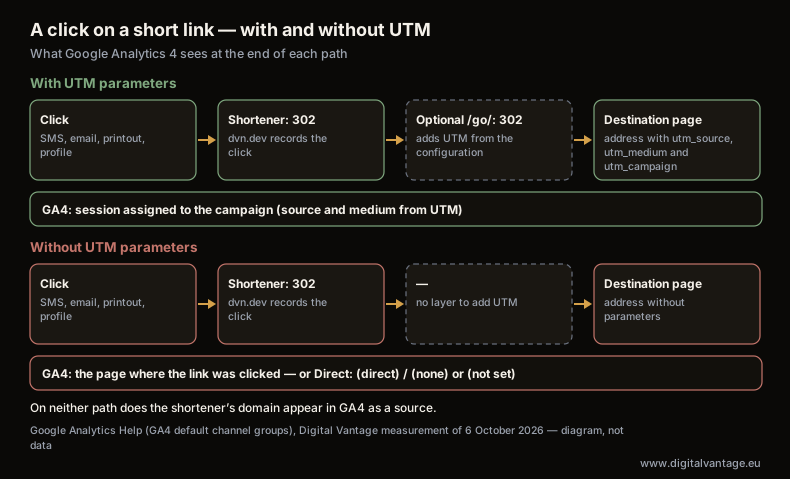
A click on a short link — with and without UTM
Google Analytics Help (GA4 default channel groups), Digital Vantage measurement of 6 October 2026
Chart description
Diagram of two paths, no numbers. Path with UTM: a person clicks a short link in an SMS, an email or on a printout; the shortener's server (dvn.dev) answers with a 302 redirect and records the click; optionally a second 302 redirect through our own /go/ layer on the company's domain, which appends the UTM parameters from its configuration; the destination page opens with utm_source, utm_medium and utm_campaign in the address; GA4 assigns the session to the campaign. Path without UTM: the same click and the same 302 redirect, but the destination page opens without parameters; GA4 assigns the session to the page where the link was clicked, and when the browser does not know it (an SMS app, a mail client, a scanner, a typed address) to the Direct channel, that is source (direct) and medium (none) or (not set). The shortener's domain does not appear in GA4 as a source on either path.
How to shorten a link — three routes
How to shorten a link depends on where you will use it and who will manage the destination later. There are three routes, and each has a different cost.
A link shortening service
The simplest route: you paste a long address into a link shortening service and get a short one. In DVN Links it works like this (as of 6 October 2026):
- Paste the full page address — if the link is for a campaign, with the UTM parameters already added (more on them below).
- Optionally enter your own alias. The features page gives
dvn.dev/twoja-kampania("your-campaign") as an example (dvnlinks.pl/funkcje). - Choose the domain. The options are
qrln.pl(all plans),dvnlinks.pl(from the Starter plan) anddvn.dev(from the Pro plan), according to the product FAQ on 6 October 2026. A customer's own domain was not on offer on that date. - Copy the link. From then on you see its clicks in the dashboard.
Most services work the same way; the differences start with the domain, link expiry and data, not with the shortening itself.
A shortener built into another tool
Some marketing tools shorten links themselves. SMS gateways often have their own shorteners — we cover them in our article on SMS campaigns. The convenience has a price: the statistics stay in that one tool, and the link usually lives as long as your account with the provider. For a single send that is enough. For a link that goes on a leaflet people will scan for a year, it is not.
Your own redirects on your own domain
The third route is redirects on your own domain, such as yourcompany.com/go/offer. That is how our /go/ layer works: each link has a slug, a destination and UTM parameters set in the site's admin panel. The server answers with a 302 redirect and a noindex header, adds the UTM parameters from the configuration and ignores any parameters someone outside has appended to the address. So nobody can "reassign" a campaign to a different source by tacking ?utm_source= onto the link. A disabled or unknown link does not end in a 404 error; it sends people to the home page — because a typo on a printout cannot be corrected, and the home page keeps the visitor.
We combine the /go/ layer with a short link from DVN Links: the short address leads to /go/{slug}, and only that leads to the destination page. This way we change the destination and the UTM parameters in our site's panel, without reprinting anything and without logging in to a second tool. How our site creates short links through the API when an article is published is described in our article on building a SaaS application. Your own redirects do, however, need someone to build and maintain them — for a few campaigns a year, a shortening service is enough.
Where a short link makes sense — scenarios
A short link pays off wherever an address has to be retyped, spoken aloud, squeezed into a character limit or counted. Everywhere else — in the body of your own website, in a button in a newsletter — the full, readable address is usually better, because people can see where they are going.
SMS
In an SMS every character counts. A standard message holds 160 characters; a single character outside the basic GSM alphabet — an emoji, but also some accented letters — lowers that limit to 70. A full page address with UTM parameters can take up most of such a message, and longer text means more message parts sent and a higher bill. A short link leaves room for the offer itself. Consent, cost and measuring SMS campaigns are covered in our article on SMS campaigns.
Email and newsletters
In an email the length of a link rarely matters, because the link sits behind a button. A short link makes sense here when the address is visible in the text (for example in the plain-text version of the message) or when you want a separate counter for each send. Remember that on the mailing side the email platform already measures clicks — which of its metrics still mean something is covered in our article on email marketing.
Link in bio
"Link in bio" is the one place in a social media profile where you can put a clickable address — hence the phrase "link in bio", which creators use to point readers away from their posts. One link has to serve many posts, so this is where a short link with a changeable destination is most useful: on Monday it leads to a promotion, on Friday to a new article, and you change it without editing the profile. Popular link-list pages (link-in-bio tools) do the same thing in a different form. Why a social profile should lead to your website rather than replace it is covered in our article on your business on social media.
Print and QR codes
On a leaflet, poster or packaging, a short link helps twice. First, people can retype it. Second, a QR code with a shorter address has fewer modules, so at the same print size it is easier to scan. A QR code that goes through a shortener is "dynamic" — you can change the destination without reprinting — but it lives exactly as long as the short link. How to make a QR code that works in print, and how much of it a logo can cover, is the subject of a separate article on QR codes.
Podcasts, radio and talks
Nobody can click an address they hear — they have to remember it and type it in. An alias like dvn.dev/podcast-12 can be said aloud; /category/subcategory/article-title-2026?utm_source=... cannot. On top of that, a separate short link shows how many visits an episode brought — without it, visits "from memory" end up in analytics under "Direct" with everything else.
Profiles in directories and portals
This is how we use short links most often. Every company profile — on Google Maps, in business directories, on freelance marketplaces, on GitHub — gets a separate link with its own utm_source. That tells us which profile brings people in and which one we can stop updating. Without it, all those visits land in a single bucket of "referral" or "Direct". We do not give numbers here: a dozen or so links is too small a sample to draw conclusions for other companies.
UTM parameters — what they are and how to tag links
UTM parameters are additions at the end of an address from which Google Analytics reads the source, medium and campaign of a visit. They look like this: ?utm_source=leaflet&utm_medium=print&utm_campaign=fair-2026. The page works exactly the same with them as without them, but GA4 knows where the session came from.
Google Analytics Help recommends always using three parameters when tagging links: utm_source (where from — e.g. the name of a portal, newsletter or printed medium), utm_medium (which channel — e.g. email, sms, print, referral) and utm_campaign (which campaign). The others, such as utm_content to tell variants apart, you add as needed — the same page advises setting all that apply, because missing ones show up in reports as "(not set)". The same page warns that values are case-sensitive: utm_source=google is not the same as utm_source=Google. You will then see two sources in the report instead of one. That is why the most valuable thing is a boring one: an agreed naming scheme — lower case, hyphens instead of spaces, the same channel name in every campaign — kept in one spreadsheet that the whole team uses. Google provides the Campaign URL Builder for this.
UTM first, shortening second
The order matters. You add the parameters to the destination address, and only then shorten that address. The short link hides the long tail, and GA4 still sees it, because the browser reaches the full address. The reverse order — appending ?utm_source= to a link that is already shortened — depends on whether the shortener passes the parameters on. Our /go/ layer deliberately does not, and how other services behave has to be checked for each one. It is safer not to find out in the middle of a campaign.
Without UTM, a visit from a short link lands in "Direct"
A shortener that sends people on with a plain HTTP redirect — which is how dvn.dev works — does not appear in Google Analytics as a source. A redirect is not a page the browser displays, so when it moves on, the browser passes along what it knew before the click: the address of the page where the link was (usually trimmed to the domain), or nothing — when someone clicked in an SMS app or an email program, scanned a code or typed the address by hand. In the latter case the session goes to the Direct channel, which GA4 defines as source "(direct)" with medium "(not set)" or "(none)" (Google Analytics Help). Services that briefly show their own interstitial page instead of an HTTP redirect can behave differently — their domain may then appear in the report as a referral.
We checked this on our own data. In the 180 days before 6 October 2026, not a single session in our site's GA4 had a source containing the name of our shortener's domains — even though short links to articles and profiles are in use. Visits through short links without UTM therefore went to "Direct" or to the source of the page where the link was clicked — and in the report they can no longer be told apart from those. If a campaign is to be visible in analytics, tagging links is not an extra; it is a precondition. What else can distort the numbers in your reports is covered in our piece on how website analytics lies.
Click statistics — what they show and what they don't
A shortener and Google Analytics count two different things, so their numbers will not match — and they should not. The shortener counts redirect requests: every visit to the short address, before any page loads. GA4 counts sessions on the destination page, and only as far as cookie consent allows — how to measure when some people refuse it is covered in our article on Consent Mode. A click after which someone closed the tab before the page loaded is in the shortener, but not in GA4.
The difference runs the other way too: it is not only people who open a short link. Messengers and portals fetch the address to build a link preview, and bots check links for malicious content. Every shortener has to decide what to do with that traffic. In DVN Links the event stream in the API has an is_bot field described as "Flagged, not filtered — the consumer decides what counts" — the event is marked, not removed, and whoever receives the data decides what to count (DVN Links API specification, as of 6 October 2026). Our /go/ layer does it differently: the counter goes up only on a GET request with a User-Agent header that does not belong to a known bot; it skips HEAD requests (the way uptime monitors, for example, check links) and requests with no User-Agent. We have not yet measured what share of the clicks on our links comes from bots — which is why we give no number.
What do a shortener's statistics actually show? In DVN Links on 6 October 2026 (dvnlinks.pl/funkcje): country, device (desktop, phone, tablet), operating system and browser, traffic source (referrer, UTM parameters, social media), a day-by-day click chart and a per-link breakdown. How long history is kept depends on the plan — according to the price list, from 7 days on the free plan to 365 days on the Business plan (dvnlinks.pl/cennik, as of 6 October 2026). What a shortener's statistics will not show: what the person did after reaching the page. An enquiry, a purchase, a sign-up — that is GA4 and your conversion goals.
A practical rule: compare trends, not totals. If the shortener shows a jump in clicks on the day of a send and GA4 shows a jump in sessions from the same campaign — the campaign works. If the shortener shows clicks and GA4 shows nothing — look for missing UTM parameters, a blocked script or traffic that is not human.
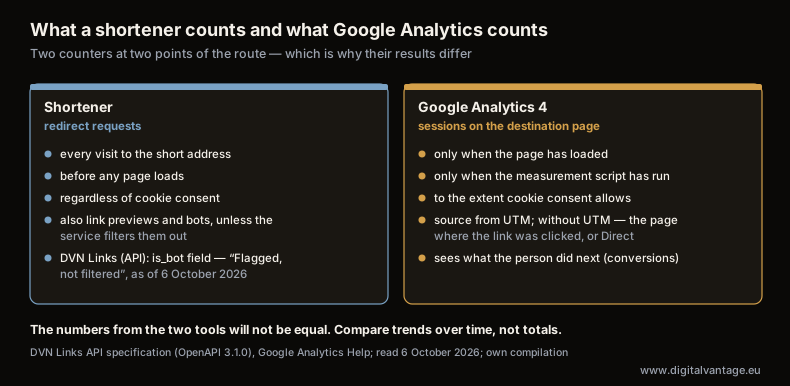
What a shortener counts and what Google Analytics counts
DVN Links API specification (OpenAPI 3.1.0), Google Analytics Help; read 6 October 2026; own compilation
Chart description
Comparison diagram, no numbers. The shortener counts redirect requests: every visit to the short address, before any page loads, regardless of cookie consent; this includes link previews in messengers and bots unless the service filters them out — in DVN Links the API event stream flags them with the is_bot field ("Flagged, not filtered", as of 6 October 2026). Google Analytics 4 counts sessions on the destination page: only when the page has loaded and the measurement script has run, to the extent cookie consent allows; it takes the source from the UTM parameters, without them from the page where the link was clicked, or assigns the session to the Direct channel. Conclusion: the numbers from the two tools will not be equal; compare trends over time, not totals.
How to choose a link shortener — seven questions
You choose a shortener for years, because a link that has been printed or sent cannot be swapped later. Before you pick a service, answer seven questions. For each, we give the answer for our own shortener as of 6 October 2026 — including when it does not work in its favour.
- Whose domain is in the link? A short link on the provider's domain builds their brand, not yours, and dies with the account. Your own domain costs more to maintain but is independent. DVN Links:
qrln.pl,dvnlinks.plordvn.devdepending on the plan; a customer's own domain is not on offer. - Do links expire? This question matters more than price. DVN Links: on paid plans links do not expire and work as long as your account is active, with the option of setting your own expiry date; on the free plan they are valid for 30 days (FAQ). A link from the free plan is therefore no good for anything meant to last longer than a month — least of all for print.
- Can you change the destination after publishing? Without that, a short link loses half its value. DVN Links: yes, at any time.
- What happens when you exceed a limit? Check the limit on creating links and the limit on clicks separately. The DVN Links price list speaks to the first: once the monthly limit is used up you cannot create new links, but existing links keep working unchanged.
- Where is the data kept and who processes it? A click is data: IP address, approximate location, device. DVN Links states that data is stored on servers in the EU, and its privacy policy (section 10) adds that some service providers may process data outside the European Economic Area, with safeguards such as Standard Contractual Clauses. It is worth finding a statement like that in every provider's policy before you sign a data processing agreement with them.
- Can the data leave the tool? Export or an API decides whether you can connect the statistics to your CRM or a report. DVN Links has a public REST API with link statistics; check the current price list for the request limits on each plan.
- Does the service check where links lead? A shortener that redirects anywhere attracts fraudsters, and domains abused for phishing end up on blocklists — together with your links. According to its terms, DVN Links filters destinations automatically, including through the Google Safe Browsing API.
There are of course well-known international services, such as Bitly, TinyURL or Rebrandly. We do not compare their prices, because we have not verified their price lists — ask each of them the same seven questions.
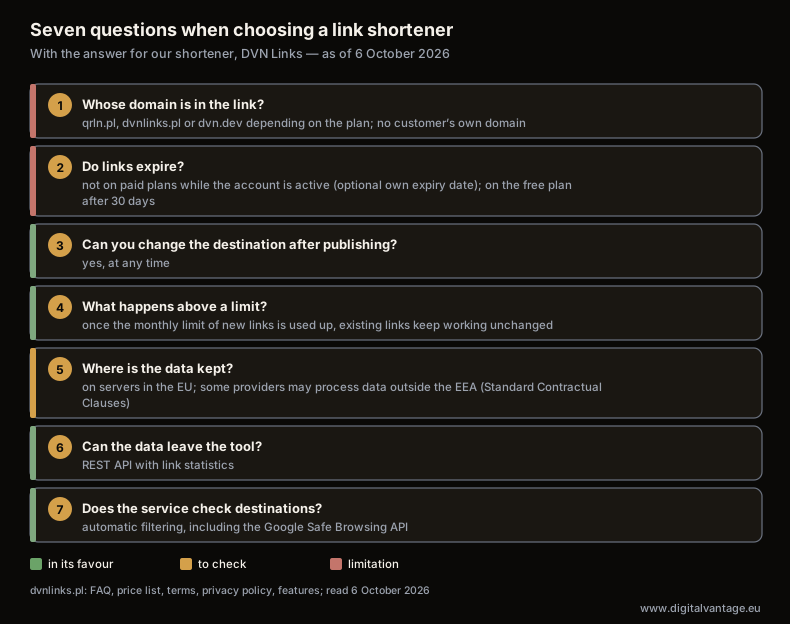
Seven questions when choosing a link shortener
dvnlinks.pl: FAQ, price list, terms, privacy policy, features; read 6 October 2026
Chart description
Checklist of seven questions with the answer for DVN Links, as of 6 October 2026. 1. Whose domain is in the link: qrln.pl, dvnlinks.pl or dvn.dev depending on the plan, no customer's own domain. 2. Do links expire: on paid plans no, as long as the account is active, with an option to set your own expiry date; on the free plan after 30 days. 3. Can you change the destination after publication: yes, at any time. 4. What happens above a limit: once the monthly limit of new links is used up, existing links keep working unchanged. 5. Where is the data kept: stored on servers in the EU; some providers may process data outside the EEA, with safeguards such as Standard Contractual Clauses. 6. Can the data leave the tool: REST API with link statistics. 7. Does the service check destinations: automatic filtering, including the Google Safe Browsing API.
Short links, security and privacy
A short link hides the destination — an advantage for the sender and a risk for the recipient. Someone who receives dvn.dev/abc does not know where it leads until they click. Fraudsters exploit this. The US Federal Trade Commission warns about malicious links in QR codes and advises checking the address before opening it (FTC, 6 December 2023); the FBI, in a notice of 18 January 2022, advises against paying on a site opened from a QR code. These are US sources, but the mechanism is the same everywhere: the less of the address you can see, the easier it is to slip in a fake one.
What this means for you as a sender:
- Use one recognisable domain across all campaigns and do not mix shorteners. A recipient who has seen your link once will recognise it next time.
- In important messages, say where the link leads — "the sign-up form on our website", not just "click here".
- Choose a shortener that checks destinations (question 7 above), because its domain is less likely to end up on blocklists.
As a recipient, you can check the destination without opening the page. Some shorteners have a preview feature — look for it in the service's help pages. Technically, it is enough to request only the header, e.g. curl -I https://dvn.dev/abc in a terminal, and read the Location field. Protecting company email and data against phishing is covered in our article on company data security.
The other side is the recipients' privacy. In its Guidelines 2/2023 on the technical scope of Art. 5(3) of the ePrivacy Directive (version 2, adopted on 7 October 2024, paragraphs 49–51), the European Data Protection Board discusses "tracking links": an identifier is appended to a page address that the page does not need in order to display its content. As an example it gives affiliate links, from which a shop recognises which partner brought the customer — an identifier of the traffic source, not of a specific person. The Board applies Art. 5(3) of the Directive, the provision on storing information on a user's device and gaining access to it, to such links, including those sent by email and SMS. These are EU guidelines, not a statute, and they do not settle directly whether ordinary UTM parameters describing a campaign are tracking links in this sense — we do not prejudge that. What is certain is that a link carrying the identifier of a specific person goes further than a link shared by a whole campaign. If you want to know who clicked, not just how many people from a campaign, ask a lawyer before you build such links. To measure campaigns, one link per campaign is enough — not one per person.
FAQ
Frequently asked questions about link shortening
It depends on the service and the plan. Some shorteners delete links from free accounts after a set time. In our DVN Links shortener (as of 6 October 2026), links on paid plans do not expire while the account is active, and on the free plan they are valid for 30 days. Before you print a short link or a QR code, check in the provider's terms or FAQ how long the link will work.
No, if you use it where it belongs: in SMS messages, on printed material, in profiles and campaigns. A short address is a redirect, not a page — Google indexes the destination page under its real address. Do not, however, replace ordinary internal links on your own website with short links: there, the full address is clearer for people and for search engines. Redirects when moving a website are a separate topic — 301 redirects.
First, look for a destination preview feature in the shortener — some services have one. Technically, it is enough to fetch only the response header, e.g. with curl -I and the short address, and read the Location field — you do not open the destination page. After scanning a code with your phone, check the address before you open the page.
Before. You add the UTM parameters to the full address of the destination page and only then shorten that address. The short link hides the long tail, and Google Analytics still reads it, because the browser reaches the full address. Parameters appended to a link that is already shortened only get through if the shortener passes them on — and not every one does.
It is a clickable address placed in the description of a social media profile — usually the only place in the profile where a link works. The phrase "link in bio" points readers from a post to that address. Because one link serves many posts, a short link with a changeable destination and UTM parameters works well here: your analytics shows how many people came from the profile.
Because they count different things. The shortener counts every redirect request, including link previews and some bots, before the page loads. GA4 counts sessions on the destination page and only as far as cookie consent allows. To judge a campaign, compare the trends from both tools, not the totals.
Set up measurement before you launch the campaign
We will help you lay out a scheme of links and UTM parameters for your channels — from SMS and newsletters to print — so that every campaign shows up in Google Analytics, not in "Direct".
Related Posts
- Online marketing — where to start and in what order
Five situations that bring companies to us for traffic and enquiries — from being invisible to holding a list of addresses nobody uses. Pick yours and read on.
- 1.SEO cost — a calculation instead of a price range
We found no independent European benchmark for SEO cost. How to turn a fee and its hours into an hourly rate, and what to ask before signing.
- 2.Email marketing — where to start, and why open rates no longer tell you anything
Open rates stopped measuring people in 2021, as Apple and the benchmark publisher admit. What Gmail has required since 2024 and what a lead magnet yields.
- 3.Renting your audience — what a social profile gives you, and what it never will
Meta announced the reach decline itself in 2018. Our own data shows how many visitors really come from social, and what remains when a channel fails.
- 4.SEO — what actually decides whether Google shows your site
One page in five of our own site is indexed. What Google's documentation says about indexing, Core Web Vitals and ranking guarantees — and what to ask a supplier.
- 5.Conversion rate — what the number actually tells you, and what it does not
Our own 180-day funnel, including a step above 100%. What research says a good conversion rate is, and why other people’s case studies do not transfer.
- 1.
About the Author
Konrad Barejko
Your Business Partner, CEO
Experienced technology leader and entrepreneur with over 20 years of experience in the IT industry. Specializes in digital transformation, software product development and building engineering teams. For nearly 15 years, he led B2B teams at a global technology corporation, managing a 40-person team of developers and engineers, multi-million dollar budgets and products deployed at the scale of tens of millions of licenses in EMEA and global markets. Today, as the founder of his own consulting firm, he helps small and medium-sized businesses make smart technology decisions - from website and online store development, to process automation, to comprehensive IT consulting. He combines strategic thinking with a hands-on technical background in web development, DevOps and software architecture. He focuses on a collaborative culture, agile methodologies and solutions that realistically support business growth.