SaaSIT strategyIT and Technology19 min czas czytania25 895 znaków3792 słowa
Micro-SaaS examples 2026 — 35 niche tools you could build
35 concrete micro-SaaS examples grouped by industry, a niche-scoring framework, a 30-day MVP plan, and a path to your first 50 paying customers.

Redakcja Digital VantageYour Partner in Business, Digital Vantage Team · Digital Vantage team is a group of experienced professionals combining expertise in web development, software engineering, DevOps, UX/UI design and digital marketing. Together we carry out projects from concept to implementation - websites, e-commerce stores, dedicated applications and digital strategies.
Our team combines years of experience from technology corporations with the flexibility and immediacy of working in a smaller, close-knit structure. We work in agile methodologies, focus on transparent communication and treat each project as if it were our own business.
The strength of the team is the diversity of perspectives - from systems architecture and infrastructure, frontend and design, to SEO and content marketing strategy. As a result, the client receives a cohesive solution where technology, aesthetics and business goals go hand in hand.
Publikacja
Aktualizacja
What's in this article
This piece walks you through the path from idea to first payment in the micro-SaaS model. It explains why small, precise tools win in 2026, how to size up a niche in 15 minutes (problem frequency, budget, the "pain moment", data/API access), and how to build an MVP in 30 days: 3 features, 1 integration, 1 report or export, and one acquisition channel. You get 35 concrete ideas grouped by industry, ready for quick testing. We cover simple pricing (Good–Better–Best with a 14-day trial) and a plan for winning your first 50 customers without a big budget: conversations, "build-in-public" posts, group demos and partnerships. We also cover the basics of GDPR/DPAs, backups, SLAs and changelogs, and close with a 90-day roadmap and the metrics that matter (Activation, MRR, churn, DAU/WAU, TTV), so you know what to fix week by week. The thread running through all of it: staying narrow, and delivering value on one pain point consistently, is what turns a niche tool into recurring revenue.
"Small but precise" — and that's exactly why it works
Picture this: instead of "the next big platform", you build a small, precise tool that solves one recurring problem in a specific niche. No bells and whistles. A handful of features. A €19–59 monthly subscription. And paying customers, because you're saving them time or hassle.
That's how micro SaaS works — a category of niche SaaS tools aimed at a very specific pain point: fire-safety inspection reminders for housing associations, a product-feed audit for small e-commerce shops, or a simple scheduling tool for tiny teams. Not "for everyone" — for someone specific. Not "everything in one place" — one thing done properly.
Take an example — this is an illustration, not a real client's story. A facilities-service company tracks quarterly and annual inspection and report deadlines in a spreadsheet, phone notes and e-mail. A tool that gives it just three things — a calendar with SMS reminders, checklists with a signature, and a PDF export of the report — solves a problem that comes back on a schedule. A product like that doesn't need a complicated sales process, because its value is obvious and it repeats.
If you run an SME or a startup, or simply have an entrepreneurial streak, micro-SaaS is a route to predictable subscription revenue (MRR) without building a corporation or an army of developers. In this article we'll cover why 2026 is a good moment, how to find a niche, and which ideas have the best odds of catching on quickly.
Indie hacker, micro-SaaS and bootstrapping — what they mean
These three terms show up together, and it's worth telling them apart. Micro-SaaS is a product: small, niche subscription software that solves one specific problem for one group of customers, and that a very small team — often a single person — can maintain. Indie hacker is a person: a builder who creates such products alone or with a couple of others, without outside investors, and measures success by profit rather than valuation. Bootstrapping is how it's funded: growth paid for out of the product's own revenue and the founder's own money, not investment rounds.
That's where the logic of this whole article comes from. Without an investor there's no budget for a long build or an expensive sales process, so what matters is a niche where the problem comes back regularly, the customer finds the product easily, and sees its value quickly — with the first payments arriving in weeks, not years.
Why micro-SaaS wins in 2026
1) Build cost is down, and time-to-market is shorter
Thanks to ready-made building blocks (payments, login, e-mail, hosting) and AI/low-code tools, an MVP can be put together in weeks, not months. For a business owner that means less risk: you test faster, fix faster, and get to revenue faster.
2) Customers prefer "small and reliable" over "big and complicated"
SMEs have specific jobs to get done: a report, a booking, a reminder, an integration. When a tool does one thing brilliantly, onboarding is trivial and the benefit is measurable. The result: a shorter decision cycle and less support load.
3) Niche SaaS tools are easier to sell
In a niche you have a clear vocabulary, clear channels, and concrete proof of value. Instead of mass campaigns, you need 3 industry groups, 2 "how to sort this in 15 minutes" webinars and 1–2 partners from that industry. Less noise, more effect.
4) The "pain trigger" keeps coming back
The best niches have problems that recur: weekly, monthly, quarterly. Micro-SaaS plugs into those rhythms (deadlines, reports, inspections, seasonality) and calms the process down — the customer is happy to pay a subscription, because the pain doesn't go away just once — it stays away.
5) Scaling without bloating the product
Instead of bolting on "every feature in the world", you grow horizontally: a new niche, a new country, a new integration. Same engine, different skin and vocabulary. That's clean, predictable scaling that doesn't wreck the simplicity.
What does this mean for you?
If you run a business, or you're thinking about your own product, don't start with "which technology should I pick?" — start with "which pain keeps coming back like a boomerang?" In the sections that follow, we'll show you how to choose a niche and move from customer conversations to your first paying subscriber — with a ready-made list of ideas, prices and simple roadmaps.
How to choose a niche (decision framework)
Before you build anything, answer one simple question: does this problem keep coming back like a boomerang — and who will pay for it to go away? Below is a short, practical framework we use with SMEs and on our own projects.
4 key criteria (the short map)
- How often the problem occurs
The more often the pain repeats (weekly/monthly/quarterly), the better it suits a subscription. One-off "events" rarely build MRR.
- The group's budget / willingness to pay
Don't ask "do you like this?" — ask "what does not having this tool cost you today?" — people's time, delays, penalties, lost revenue. If it saves real money or time, there's a budget.
- The "pain trigger"
Compliance, reports, inspections, orders, seasonality. These are concrete triggers you can hang reminders, automations and checklists off.
- Data/API availability
If you can safely pull or produce data (APIs, CSV/PDF exports, integrations), you'll deliver value faster and without manual work.
The 7-question checklist (use it as a filter)
- Who pays, and why now? (a specific decision-maker, not "everyone")
- How often does it hurt? (week/month/quarter/season)
- What does it cost today? (people's time, mistakes, penalties, lost leads)
- What's the "pain trigger"? (deadline, report, inspection, audit, season)
- How is it handled today? (spreadsheets, e-mail, manual copy-paste, an agency)
- Do you have data/an API? (integrations, exports, webhooks, OCR as plan B)
- Can you reach that group in 2 weeks? (specific Facebook/LinkedIn groups, forums, industry partners, newsletters)
Decision: if you get at least 5 solid "yes" answers out of 7, with a clear pain trigger, move on to customer conversations and a 3-feature MVP.
Quick scoring (1–5)
- Frequency: 1 = rarely, 5 = weekly/monthly
- Budget/willingness: 1 = "nice to have", 5 = "we pay, or we lose money"
- Pain trigger: 1 = vague, 5 = hard deadline/risk
- Data/API: 1 = none, 5 = easy integrations/exports
- Reach: 1 = no channels, 5 = you have a list and an in
- Competition: 1 = red ocean, 5 = a niche with room to specialise
- Fit for you: 1 = zero context, 5 = your own environment/customers
Threshold to start: ≥ 23 points → move to 10 problem-discovery conversations and an MVP sketch.
Niche scoring card — seven criteria, scale 1–5
Print it or copy it out; below 23 points, the idea can wait
Digital Vantage — criteria described in this article
35 micro-SaaS ideas (grouped by industry)
This list isn't inspiration to file away — it's a set of concrete briefs for a quick MVP. Every idea follows the same shape: Problem → Solution → MVP (2–3 features) → Starting price → Acquisition channel.
That means you can size up whether a topic is worth pursuing in 10 minutes, without technical jargon or long analysis.
How to read and choose:
- Skim the industries you know from real life (your customers, partners, your own business).
- For 2–3 entries, run our 7-question checklist and add up the score on paper.
- If the score is ≥ 23, plan a 30-day MVP: 1 core feature, 1 integration, 1 report/export.
- Start with one acquisition channel (a Facebook/LinkedIn group, a webinar, an industry partner) and have your first 10 customer conversations.
> Tip: pick problems with a regular "pain trigger" (deadline, report, season) — that's the fuel for a lasting subscription.
*Format: Problem → Solution → MVP (2–3 features) → Starting price → Acquisition channel*
E-commerce & marketplaces
- Product-feed auditor
Problem → errors in feeds (Google/Facebook/marketplaces), rejected products, falling ROAS.
Solution → automatic validation and quick fixes.
MVP → feed validator (CSV/XML), e-mail alerts, quick fixes (field mapping).
Starting price → €19–49/month.
Acquisition channel → industry Facebook groups, LinkedIn, performance-marketing partners.
- Abandoned-cart monitor + smart follow-up
Problem → lost sales, no personalisation in reminders.
Solution → e-mail/WhatsApp sequences based on cart value and history.
MVP → abandonment detection, a 2-step sequence, a simple template editor.
Starting price → €29–79/month.
Acquisition channel → Shopify/Woo plugins, integration marketplaces.
- Margin calculator with dynamic discount thresholds
Problem → discounts set "by feel", shrinking margins.
Solution → a margin calculator and threshold recommendations.
MVP → import prices/costs, discount simulations, a margin report.
Starting price → €19–39/month.
Acquisition channel → a "margin vs. discount" webinar, e-commerce newsletters.
- Returns-policy generator (country/category)
Problem → returns chaos, legal risk.
Solution → templates matched to country and category.
MVP → a Q&A builder, PDF/HTML export, update reminders.
Starting price → €9–19/month.
Acquisition channel → legal/e-commerce blogs, seller groups.
Marketing & content
- Content planner with SEO briefs for niches
Problem → content that gets no results, no briefs.
Solution → topics plus article outlines for a given industry.
MVP → a calendar, a brief generator (H2/H3 plus keywords), CMS export.
Price → €19–59.
Channel → industry groups (dentistry, law), partnerships with copywriters.
- Video repurposer → shorts
Problem → long video doesn't work on social.
Solution → auto-cuts, captions, hooks.
MVP → upload, 2 cuts plus captions, 9:16 export.
Price → €15–49.
Channel → YouTube/TikTok creators, social agencies.
- UTM tracking + last-non-direct attribution
Problem → unclear lead sources.
Solution → simple attribution and a dashboard for SMEs.
MVP → a UTM link shortener, cookies plus a report.
Price → €9–29.
Channel → "how to measure your campaigns" blog content, CRM partners.
- Event landing-page generator + RSVP
Problem → scattered sign-ups, manual e-mails.
Solution → one-click landing pages plus an attendee list.
MVP → 3 templates, RSVP, CRM export.
Price → €19–49.
Channel → meetup communities, local chambers of commerce.
Finance & compliance (SMB)
- Payment reminders + a mini customer portal
Problem → late payments, manual chasing.
Solution → automatic follow-ups and status tracking.
MVP → invoice integration (CSV/API), e-mail/SMS sequences, a status panel.
Price → €9–29.
Channel → accounting firms as partners, LinkedIn.
- Cash-flow reports for small shops
Problem → manual reconciliation, errors.
Solution → automatic PDF/CSV reports.
MVP → import from a till/Excel, report generation, e-mail to the accountant.
Price → €9–19.
Channel → retailer groups, trade associations.
- ROPA in a few clicks
Problem → GDPR documentation chaos — keeping a Record of Processing Activities up to date.
Solution → a ROPA builder with updates.
MVP → templates, version history, an audit-ready export.
Price → €19–39.
Channel → data-protection law firms and DPOs, compliance webinars.
- Regulatory-change monitor (regulated niches)
Problem → hard to keep up with the rules.
Solution → weekly alerts plus change checklists.
MVP → source curation, e-mail alerts, "what to do now" guidance.
Price → €29–79.
Channel → industry newsletters, legal partners.
Real estate & local services
- Viewing calendar + SMS reminders
Problem → no-shows, scheduling chaos.
Solution → bookings plus communication templates.
MVP → calendar, SMS, e-mail templates.
Price → €19–39.
Channel → estate-agent groups, listing portals (via blog content).
- Interactive price list + booking
Problem → unclear pricing, endless calls asking "how much?"
Solution → an interactive price list with booking built in.
MVP → a configurator, calendar, confirmations.
Price → €9–29.
Channel → beauty/service trades, POS-system partners.
- Technical inspections: schedule + checklists
Problem → inspections handled at the last minute.
Solution → a plan plus a report for the customer.
MVP → calendar, checklists, a signed PDF.
Price → €19–49.
Channel → facilities-service companies, B2B cold-to-warm via referrals.
- Tenant screener (risk assessment)
Problem → poor tenants, late payments.
Solution → risk scoring and a document checklist.
MVP → a form, scoring, a conditional-lease generator.
Price → €19–39.
Channel → landlord groups, letting agencies.
HR & operations
- Micro-ATS (1–5 hires a month)
Problem → CVs buried in inboxes, no status tracking.
Solution → a simple recruitment pipeline.
MVP → a job posting, a candidate board, notes plus statuses.
Price → €19–49.
Channel → SME HR communities, job boards (via articles).
- Rota planner + shift swaps
Problem → shift conflicts, absences.
Solution → rotas and self-service swaps.
MVP → rota creation, a swap request, notifications.
Price → €9–19.
Channel → retail/hospitality (HoReCa) groups, POS-system partners.
- Onboarding + health & safety/GDPR training with e-signature
Problem → paperwork, and no audit trail.
Solution → checklists plus electronic signatures.
MVP → a task list, a signature module, a document repository.
Price → €19–59.
Channel → health & safety and GDPR consultancies as resellers.
- Pulse eNPS for small teams
Problem → no feedback, no early warning of turnover.
Solution → short surveys and trend alerts.
MVP → recurring surveys, a dashboard, deviation alerts.
Price → €9–29.
Channel → LinkedIn (team leads), HR podcasts.
Creators, consultants & B2B services
- Simple CPQ (quote builder)
Problem → quotes built from scratch each time, no consistency.
Solution → quote templates and a line-item calculator.
MVP → a configurator, a PDF/link quote, "open/signed" status.
Price → €19–39.
Channel → freelancer groups, partner agencies.
- Contract signing + renewals
Problem → missed deadlines and amendments.
Solution → e-signature plus renewal reminders.
MVP → template upload, signing, a "30 days before" alert.
Price → €9–29.
Channel → law firms and accountancies (referrals).
- Mini-CRM — "pipeline on one board"
Problem → micro-businesses have no visibility into their pipeline.
Solution → a board with stages and simple notifications.
MVP → kanban, tasks, follow-up reminders.
Price → €9–19.
Channel → SME communities, "sell without an enterprise CRM" content.
- Project time-tracking + hourly invoicing
Problem → time slips away, invoices go out late.
Solution → time-tracking that turns straight into an invoice.
MVP → a timer, rates, invoice/CSV generation.
Price → €9–29.
Channel → freelancers, 1–10-person software houses.
IT & dev-tools
- Cron and webhook health checks
Problem → silent failures, no reporting.
Solution → pings plus a weekly report.
MVP → URL/cron monitoring, alerts, a weekly report.
Price → €9–19.
Channel → Product Hunt, developer newsletters.
- Changelog as a Service
Problem → changes never get communicated to customers.
Solution → a changelog widget plus RSS.
MVP → an entry panel, an embeddable widget, RSS.
Price → €9–19.
Channel → indie-dev communities, a GitHub readme badge.
- App licensing (web/desktop)
Problem → keys shared freely, no visibility into usage.
Solution → a key service with limits and light telemetry.
MVP → key generation/counting, verification, a usage report.
Price → €19–49.
Channel → framework forums, SDK plugins.
- Uptime + synthetic checkout tests
Problem → losses from an outage or a checkout bug.
Solution → transactional monitoring.
MVP → cart-flow testing, alerts, a daily report.
Price → €9–29.
Channel → e-commerce developers, payment integrators.
AI & automation (practical, small-scope uses)
- AI labelling for a shared inbox (routing)
Problem → e-mail lands "everywhere", no SLA.
Solution → labels plus routing to people/processes.
MVP → basic classification, assignment rules, an SLA report.
Price → €9–19.
Channel → helpdesk communities, Google/Microsoft partners.
- Contract summariser with risk tags (small law firms)
Problem → time-consuming reading, risk of missing something.
Solution → summaries plus red flags.
MVP → PDF upload, section summaries, a risk list.
Price → €29–79.
Channel → legal groups, compliance webinars.
- Q&A on your company's knowledge base (widget)
Problem → the team and customers keep asking the same questions.
Solution → a chatbot built on your files/URLs.
MVP → upload, an embedded chat, a question log.
Price → €19–49.
Channel → agencies/consultants, tooling forums.
- AI brief collector for quote requests
Problem → incomplete leads, endless back-and-forth by e-mail.
Solution → a smart form that gathers requirements.
MVP → a dynamic form, a brief summary, CRM export.
Price → €19–59.
Channel → B2B service websites, CRM partners.
Niche industries
- Pitch/court bookings for municipal facilities
Problem → phone calls and a paper diary, booking conflicts.
Solution → simple online booking plus payment.
MVP → a calendar, a deposit payment, confirmations.
Price → €9–19.
Channel → local authorities/sports centres, local resident groups.
- Fire-safety inspections: schedule + documentation
Problem → fines and slipping deadlines, no checklists.
Solution → a schedule plus checklists plus a report.
MVP → reminders, a checklist, a signed PDF.
Price → €19–39.
Channel → fire-safety and health & safety firms, facilities management.
- Allergen labels and menu cards (EU)
Problem → labelling requirements, frequent menu changes.
Solution → a generator for compliant labels and menu cards.
MVP → an allergen database, a label/menu builder, PDF/print output.
Price → €9–19.
Channel → hospitality (Facebook groups), POS/wholesale suppliers.
Building an MVP in 30 days
The rule: "one thing, done properly". For micro-SaaS, we define an MVP as: 3 must-have features + 1 integration + 1 report/export + 1 acquisition channel. Nothing more.
A 4-week plan (the working pattern)
Week 1 — the problem and a rough solution
- 10 conversations with potential users (15–20 minutes each).
- Write down the specific tasks they currently do by hand (spreadsheets, e-mail, copy-paste).
- Define your 3 must-haves (e.g. "booking", "SMS reminder", "PDF for the accountant").
- Build a clickable prototype (Figma/Notion) and show it to 3 people. Collect their own words — those become your landing-page headlines.
Week 2 — core flow, auth and payments
- Build 1 core screen (e.g. a list of tasks/deadlines) and 1 flow, start to finish.
- Add auth and Stripe (14-day trial).
- Store data in simple tables ("sane" column names, no premature magic).
Week 3 — integration and a report/export
- Wire up 1 integration that removes the most manual work (e.g. CSV import, a CRM webhook, a calendar).
- Add 1 report/export (PDF/CSV/Excel) — companies love "proof it happened".
- Write 3 onboarding e-mails (day 0, day 3, day 10): "how to get your first result".
Week 4 — real-world use and first payments
- Invite 5–10 users from your conversations.
- Polish the empty state (sample data plus a "first 5 minutes" checklist).
- Set a starting price and launch 1 acquisition channel (a webinar, an industry group, a partner).
The 3 must-have features — how to pick them
- Automate the boring part — what takes the most time today? (e.g. reminders, imports)
- A control view — a simple dashboard or list showing upcoming deadlines or open tasks.
- Proof of value — a report/export the customer can show someone else (a boss, an accountant, an inspector).
1 integration — the 80/20 rule
- Pick whatever shortens onboarding ("one click → your data's in"). Usually: CSV, a calendar, a CRM, e-mail/SMS.
- Don't add integrations "just in case". One done well beats five done half-heartedly.
1 report/export — the format matters
- PDF "for the customer/inspector", CSV "for the accountant", Excel "for the owner".
- A report is documented savings of time or money → better trial-to-paid conversion.
1 acquisition channel — narrow and deep
- An industry group (Facebook/LinkedIn), a 30-minute webinar, a partner (an accounting firm, a law firm, an integrator).
- One channel means a clear message, fast feedback, and your first 10 paying customers.
An example stack (production-grade, but light)
- Code: Next.js or Remix
- Database: Supabase (has a free tier) or another managed PostgreSQL database — note PlanetScale has had no free tier since April 2024
- Payments: Stripe (plan + trial)
- E-mail: Resend or Twilio SendGrid (onboarding + alerts)
- Auth: Clerk or Auth0
A no-code/low-code alternative (when time matters most):
Softr (UI) + Airtable (data) + Make (automation) + Stripe (payments).
Ideal for validation: you launch faster, and can rebuild on a coded stack later.
Build it yourself, or hand it off
The four-week plan above is doable solo — on one condition: that you can write code, and you actually have those four weeks free. The case that lands on our desk most often looks different. The idea is good, and the niche is understood first-hand, because someone's lived in it for years. But that same person won't set up login with payments themselves, and doesn't know where "a small change" ends and "rewriting half the product" begins.
In that case, the sensible split of work is this: you bring the niche, the first ten conversations, and the call on what's must-have. We take the part that's easiest to lose three months in — login, payments, one integration, a report, and a deployment that's actually ready to sell. We build a production-ready MVP, not a throwaway prototype that dies after the first paying customer. If an idea hasn't passed the seven-question checklist above yet, we'll say so up front, rather than quote you for building something nobody's asked for.
Pricing and packages
The goal of pricing: explain the value in 10 seconds and make it easy to start.
The "Good–Better–Best" model (+ 14-day trial)
- Good (€9/month) — 1 account, the core feature, 1 CSV export.
- Better (€29/month) — everything in Good, plus an integration, automatic reminders, PDF.
- Best (€59/month) — priority support, extra templates/reports, higher limits.
14-day trial: an onboarding e-mail sequence plus an in-app checklist. Measure Activation (did the user reach "first success" — e.g. added 1 task and sent 1 report).
Seat-based, feature-based, or usage-based — when to use which
- Seat-based (per person/user)
Choose this when the tool is shared across a team (rotas, CRM, ATS).
Upside: easy to understand. Watch out: small businesses hate counting seats — consider a 3-seat minimum on the plan.
- Feature-based (per feature/package)
Works well when "higher" plans unlock real value (e.g. automations, integrations, e-signatures).
Upside: a clear reason to upgrade. Watch out: don't hide the basics behind a paywall.
- Usage-based (per usage/limit)
Ideal when cost scales with benefit (number of SMS messages, PDFs generated, records, API calls).
Upside: scales with the customer. Watch out: set soft limits and show usage clearly (a progress bar).
Quick rules for deciding
- Team-based work → seat-based (e.g. a rota planner, a mini-CRM).
- Extra power/convenience → feature-based (automations, integrations).
- Unit cost/scaling → usage-based (SMS, AI queries, documents).
- You can combine them: a Better plan with a usage limit, and a Best plan with a higher limit plus priority support.
Example: DVN Links pricing
Here's what that looks like in practice at DVN Links, our own SaaS — a European link management platform with link shortening, analytics and QR codes. Its pricing combines all three mechanisms from this section:
- usage-based — plans differ mainly by their limits: from 50 links and 1,000 clicks a month on the free plan up to 10,000 links and 250,000 clicks on the Business plan;
- feature-based — higher plans unlock longer analytics history (7, 30, 90 and 365 days), QR codes with a logo, and a short custom domain;
- API access — absent on the free plan, with the request limit growing on paid ones (10,000 an hour on Pro, 50,000 on Business).
Prices are PLN 0, 39, 79 and 199 a month, annual billing is 20% cheaper, and the largest customers get a custom-priced Enterprise plan. The middle Pro plan is flagged "Most popular" and comes with a 7-day trial — a textbook "Good–Better–Best" setup, with the eye drawn to the plan you want to sell.
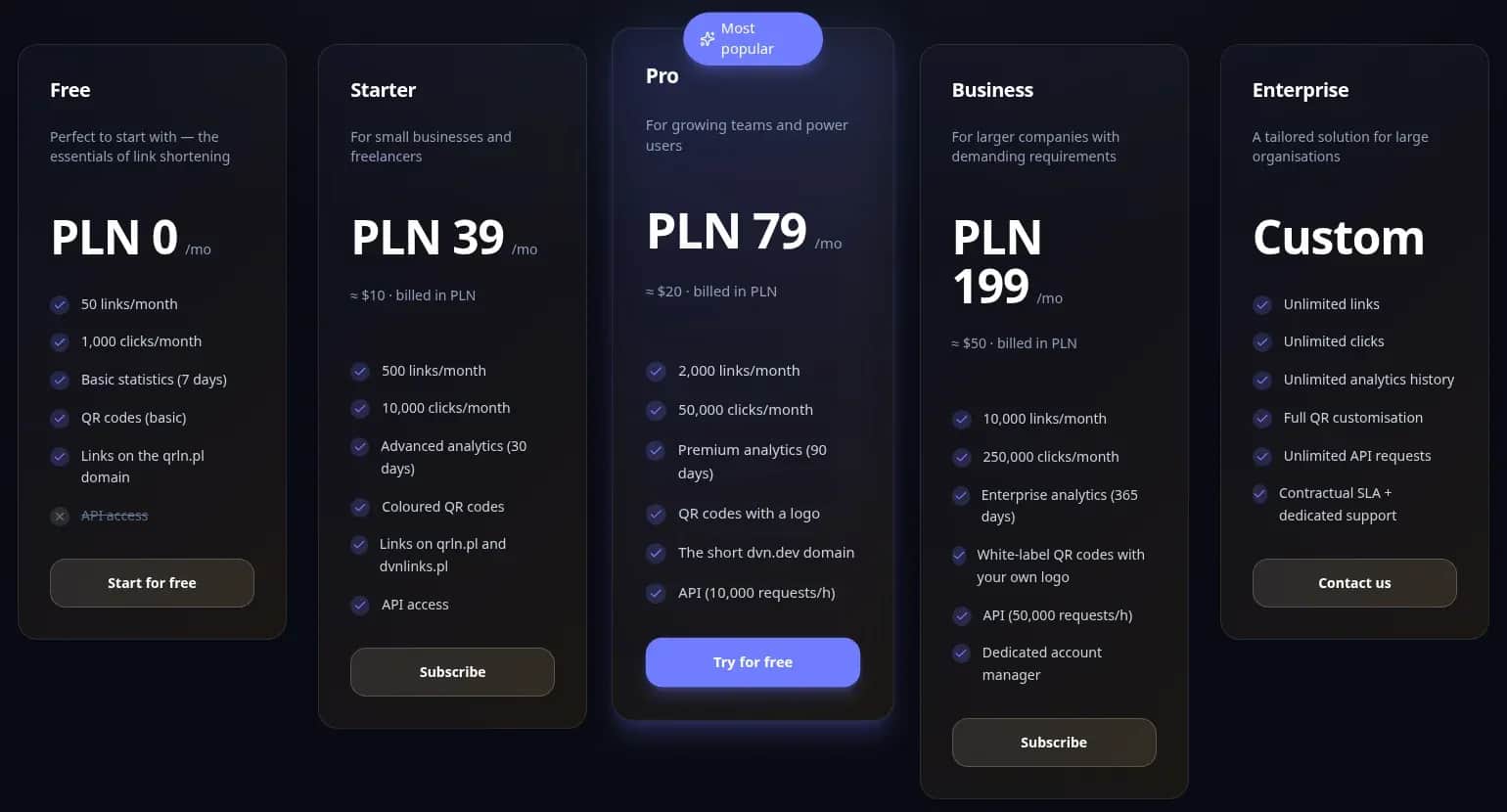
DVN Links pricing — limits, features and API across five plans
dvnlinks.pl/en, screenshot of 30 September 2026
Pricing psychology, and raising prices
- Price should track the saving (e.g. €29 ↔ one fewer missed appointment = it pays for itself).
- Raise prices for added value (new reports, integrations), with a "grandfathered pricing for existing customers" rule → lower churn.
Your first 50 SaaS customers
Goal: win your first paying customers quickly and cheaply, to confirm product–market fit.
Tactics that work
- 10 problem-discovery conversations (weeks 1–2)
Keep it short: "What hurts most today? How do you deal with it? What does it cost you?"
Write down the exact words people use — they'll become your landing-page headlines.
- 10 "build-in-public" posts (weeks 1–4)
Format: 1 screenshot + 1 number + 1 takeaway. E.g. "Took 2 hours → removed 5 e-mails a week."
Post in LinkedIn/Facebook niche groups. CTA: "want the beta? DM me."
- Demos in 5 Facebook/Slack groups (weeks 3–6)
20–30 minutes on "how to sort X in 10 minutes". Give out a 30-day trial code.
After each session — 3 follow-up messages (day 0, day 3, day 10).
- 3 partners (agencies/consultants) (weeks 4–8)
The pitch: a 20% revenue share plus a "how to roll it out in an hour" guide.
Partners bring leads in exchange for fast wins with their own clients.
The minimum "sales kit"
- Landing page: 1 problem → 1 promise → 3 benefits → social proof (a quote) → a "Start trial" CTA + FAQ.
- Onboarding (3 e-mails):
- Day 0: "Your first result in 5 minutes" (a 3-step checklist plus a short video)
- Day 3: "The most common mistake, and how to avoid it" (a tip plus a mini case)
- Day 10: "Is this already saving you time?" (a 1-question survey plus an offer of a 15-minute call)
- Demo webinar (1/month): a fixed agenda, the same link every time, the recording sent to every trial user.
Keeping it running: legal and security basics (short and to the point)
- GDPR basics: a privacy policy, a DPA (data processing agreement) with your processors (hosting, e-mail), data minimisation, the right to erasure.
- Data storage: an EU region (if you serve EU customers), encryption at rest and in transit, daily backups, 30–90 days of retention.
- Change logging: an audit trail (who/what/when), especially for exports and record edits.
- A "lite" SLA: 99.5% monthly availability, support response times, a maintenance window.
- A status page: a simple page with uptime and an incident history.
- A changelog: short "what's new/fixed" entries, via RSS/e-mail — it cuts support load and builds trust.
- VAT on cross-border sales: the euro pricing above isn't incidental — micro-SaaS usually sells outside a single country. If you're established in one EU member state, the €10,000-a-year threshold for cross-border sales of electronic services to consumers in other EU countries is counted together across the current and the preceding calendar year; once you cross it, VAT is due at the customer's country rate, most simply declared through the OSS scheme (European Commission). Sales outside the EU bring their own tax rules on top.
- A Merchant of Record instead of handling it yourself: the alternative is an intermediary that formally becomes the seller and takes on the tax, refunds and chargebacks — for example Paddle or Stripe Managed Payments (most EU markets are on the supported list, access is subject to a review, and it covers only certain digital products). Mind the difference: Stripe Tax calculates and collects the tax, but according to Stripe, you remain the merchant of record and the party responsible for it.
Selling SaaS to consumers in other EU countries — how to handle VAT
European Commission (OSS), Paddle, Stripe documentation, read 30 September 2026
A 90-day SaaS roadmap (a template to copy)
Weeks 1–2: validate the problem + list your features
- 10 conversations, define 3 must-haves, a prototype, a list of integrations.
Weeks 3–6: MVP + 1 integration + payments
- Auth, 1 core flow, Stripe (14-day trial), 1 integration, 1 export/report.
Weeks 7–9: first rollouts, onboarding, a pricing test
- 10 beta accounts, day-0/3/10 e-mails, a Good–Better–Best test (€9/29/59), UX fixes.
Weeks 10–12: retention: e-mails, re-engagement, NPS
- "Unused account" sequences, "come back to task X" nudges, NPS and a prioritised list of fixes based on the feedback.
FAQ
Micro-SaaS — frequently asked questions
Micro-SaaS solves one narrow problem for a specific niche, has a small feature set, a low build cost and a fast time-to-market. Classic SaaS is broad, complex and more expensive to run.
Yes. Softr + Airtable + Make + Stripe are enough to validate demand. If it takes off, you can move to a coded stack later without changing the model.
It depends mostly on who's building it. If you build it yourself on no-code tools, the main cost is your own time plus tool subscriptions. If you commission the build, cost follows scope — you can work out a rough figure for your own scope in our web-app cost calculator. Either way, shortening the time to first payment matters more than a perfect product.
No demand → 10 conversations before writing any code.
An overbuilt MVP → 3 features, 1 integration.
Legal/security → a DPA, EU hosting, backups, change logs.
No customers → 1 channel and consistency (posts plus a demo every month).
1) Activation rate
What it is: the share of new accounts that reached their first measurable value.
Examples of a "first success":
- an inspection planner: created 1 inspection + generated 1 PDF
- bookings: added a calendar + accepted 1 booking
- an abandonment monitor: connected a shop + sent 1 sequence
2) MRR
What it is: the sum of active subscriptions, normalised to a monthly amount. One-off payments and implementation fees don't count.
3) Churn (cancellations/month)
Logo (customer) churn — % of accounts that left
Logo churn (m/m) = (accounts lost in the month / accounts at the start of the month) × 100%
4) DAU (Daily Active Users)/WAU (Weekly Active Users)
Daily/weekly activity among unique users.
Stickiness:
DAU/WAU (or DAU/MAU) — the share of weekly (monthly) users who come back every day.
5) Time-to-Value (TTV) — time to first benefit
Definition: the time from sign-up to Activation (the first valuable event).
Measure it as the median and the p95 (a long tail shows you "where it hurts").
Want to talk through your micro-SaaS idea?
Book a free consultation — we'll take you from the problem to an MVP and your first customers.
Related Posts
- SaaS — what it is and when subscription software makes sense for a business
What SaaS is: software as a service by NIST's definition, real business examples, SaaS vs in-house software, and when a subscription pays off.
- 1.Cloud computing — what it is and how IaaS, PaaS and SaaS differ
Cloud computing by the NIST definition: five traits, IaaS, PaaS and SaaS, public, private and hybrid cloud, and how EU businesses actually use the cloud.
- 2.Cloud security: who's responsible for what, and what to ask your provider
Cloud security and cloud data security explained: shared responsibility, GDPR data processing agreements, US data transfers, NIS2 and your cloud exit strategy.
- 3.Freemium or free trial? The SaaS subscription model in numbers
Freemium, trial without a card, or trial with a card: ChartMogul conversion data, time-to-value, churn, MRR, LTV:CAC and the EU cloud market from Eurostat.
- 1.
About the Team
Digital Vantage Team
Your Partner in Business, Digital Vantage Team
Digital Vantage team is a group of experienced professionals combining expertise in web development, software engineering, DevOps, UX/UI design and digital marketing. Together we carry out projects from concept to implementation - websites, e-commerce stores, dedicated applications and digital strategies. Our team combines years of experience from technology corporations with the flexibility and immediacy of working in a smaller, close-knit structure. We work in agile methodologies, focus on transparent communication and treat each project as if it were our own business. The strength of the team is the diversity of perspectives - from systems architecture and infrastructure, frontend and design, to SEO and content marketing strategy. As a result, the client receives a cohesive solution where technology, aesthetics and business goals go hand in hand.