WebsitesIT strategy5 min czas czytania5087 znaków930 słów
Websites — a guide to the whole section
Eleven departments in three stages: before the site exists, while it is built, and once it is running. Go into the one that describes your situation.

This is everything we write about company websites: what to settle before anyone starts designing, what happens during the project, and what costs money for years afterwards once the site is up.
It is a switchboard, not a text to be read front to back. Eleven departments, each with its own entry page and its own set of articles.
How to use this. Every department below is introduced by a sentence you could say about your own situation. Find yours and go into that one department — its own switchboard takes it from there. None of this has to be read in order.
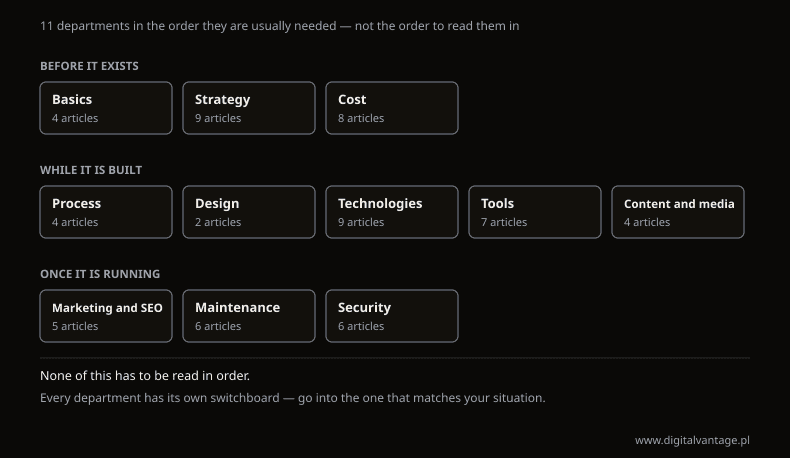
Section map — 11 departments in three stages
Own analysis
Before the site exists
Three departments for the stage where there is no site yet, or there is one and a decision about a new one has been taken. It is the only stage where changing your mind costs nothing — decisions stay cheap right up until somebody acts on them.
"I don't know what kind of site I actually need." The department that sorts the words from the offers onto one axis: how a one-page presence differs from a landing page and from a full site, how to tell that the simplest option is enough, and when a website is not the first thing to spend money on. Four articles, from whether a site pays for itself at all to what has to appear on the simplest brochure site.
→ Types of websites — one axis instead of six categories
"The site exists, but I have no idea whether it does anything." Nine situations companies come to us with: planning before a project, an audit of what already stands, a rebuild forced by the calendar rather than by taste, and measuring results. These are the decisions that cannot be delegated to a supplier, because they are about why the site exists at all — rebuild versus optimisation, accessibility, and the four ways analytics can lie to you.
→ Website strategy — pick your stage
"I have two quotes and they differ several times over." The largest department, because the question about price comes back at every stage and means something different each time: the project quote, the recurring bills, the reason two offers for the same thing differ sixfold. Eight articles, plus two reference points in the switchboard itself: market medians and our own starting rates, with build and upkeep counted separately.
→ Website costs — what they are made of
While the site is being built
Five departments for the stage where the decisions have been taken and the work starts. This is usually where it turns out how much of that work sits with the client — nearly always more than they assumed.
"I'm commissioning a site and I don't know what will be needed from me." The order of the stages and the moment your decision is required. The most practical part covers the brief and the layout sketch — the two places where the client has the greatest influence on the result and usually does not use it. Four articles, including one on when a plain HTML site genuinely suffices and what happens to it afterwards.
→ Stages of building a website
"They showed me a mockup and I don't know what to judge in it." What gets settled in the design and what the code can no longer undo cheaply. Two articles and three tests you can run on your own site in a quarter of an hour, without anyone's help — one takes UX and UI apart into what can actually be assessed, the other takes the mobile layout and how much phone traffic you really have.
→ Website design — what is decided here
"The offer is full of words I don't understand." Nine articles about what to build a company site on, written for the person who has to make the decision rather than for a developer. They settle things that offers present as obvious: what headless actually buys you, where saving on hosting comes back as a cost, and what changing your mind will cost in three years.
"I want to do it myself and I don't know what with." Seven articles ordered by the stage you are at: which family of systems to pick, when a subscription builder is enough, what to put on WordPress, how to check a finished site and how to set up measurement so the numbers mean something. Most useful when you want to know where the line runs past which doing it yourself stops paying off.
"The site is waiting for copy and photos nobody has produced." The one part of a project you cannot buy together with the site — and the most common reason launches sit still for weeks. Four articles: where to get photographs legally, what to do when there is no idea for the content, when a company blog is a cost without a return, and what Google says in its own words about writing for search.
→ Content and media on a company site
Once the site is running
Three departments about what begins the day after launch — which is exactly where most offers end.
"The site is up, but nobody visits it." Five situations ordered by the problem rather than by the tool: no traffic, traffic but no enquiries, the whole presence sitting on somebody else's platform, a mailing list nobody does anything with. Each leads somewhere different, and confusing them is the most expensive mistake in this part.
→ Online marketing — where to start
"The site went down overnight and a client told me." Six ways into the department about what happens on a recurring basis: keeping the site up, keeping it fast, having somebody responsible for it, and surviving a change of supplier or host. These are the costs least discussed when a site is ordered and paid for throughout its life — including two purely emergency texts, on the error codes you see and on who to call when the server fails.
"I'm afraid somebody will break in — or somebody already has." The department that starts with a list of accounts rather than with a firewall, because that is what actually happens to small companies. Six articles: updates, certificates, backups, privacy notices and data protection — and the three that matter most cost nothing. The certificate text answers the question people most often pay for unnecessarily: whether the free one is enough.
→ Company cybersecurity around a website
If none of those sentences fits
The order is usually this: start with the basics if there is no site, or with strategy if there is one and nobody knows whether it works. Both of those departments carry on by themselves — each is a switchboard just like this page.
If you are after a specific figure or a specific deadline, the shortest route is the cost or the maintenance department. And if you are looking for a supplier, that is a separate conversation and it does not run through articles — it runs through what you already have.
Not sure which department to go into?
One conversation is usually enough to establish whether the problem is in the site, in the measurement, or in the fact that nobody is finding it. We start from what you already have.
Related Posts
- Websites — a guide to the whole section
Eleven departments in three stages: before the site exists, while it is built, and once it is running. Go into the one that describes your situation.
- 1.Website cost — the two halves of the bill and where yours sits
Build and upkeep are two separate bills. Market medians, our own starting rates, and eight articles — one for each question people ask about cost.
- 2.Website security - a comprehensive guide for businesses
Learn more about securityst. A practical guide with concrete tips and examples. Learn best practices and avoid common mistakes.
- 3.Website tools — five situations and the one text that fits yours
Five situations: choosing a system, building it yourself, WordPress editors, checking a finished site, and measuring it. Start with the one that is yours.
- 4.Online marketing — where to start and in what order
Five situations that bring companies to us for traffic and enquiries — from being invisible to holding a list of addresses nobody uses. Pick yours and read on.
- 5.Website maintenance — six ways into this section and where to start
Website maintenance is four jobs: keeping a site running, fast, accountable and able to survive change. Six ways in, and where to start.
- 6.Content and media on a company website — where to start and in what order
Four situations businesses come to us with: no idea what to publish, no visibility, no images, and the question of whether to blog. Pick yours.
- 7.Website technologies — what to build on, and what changing your mind costs
Nine texts on what to build a company website on: the words in a proposal, platform choice, headless, hosting. Start with the phase you are in.
- 8.Nine website situations — and which text answers each one
Nine situations firms arrive with: planning, audit, modernisation, measuring results. Pick the one that describes yours and go straight to the specifics.
- 9.Dictionary of Internet Terms for Entrepreneurs - Basics of IT Communication
Glossary of technical and marketing terms - the article will help you speak the same language as the IT team and make informed decisions online.
- 1.